This guide explains how eager batching influences inference performance on Hailo-8 and Hailo-8L devices when using DeGirum PySDK. We’ll walk through benchmarks comparing two object detection models with different batch configurations. The aim is to help you understand when and how batching improves throughput. If you’re looking to improve performance for larger models on your Hailo devices, eager batching can be an effective solution.
Setting up your environment
This guide assumes that you have installed PySDK, the Hailo AI runtime and driver, and DeGirum Tools.
Click here for more information about installing PySDK.
Click here for information about installing the Hailo runtime and driver.To install degirum_tools, run
pip install degirum_toolsin the same environment as PySDK.
What is eager batching?
Eager batching refers to the technique of queuing multiple inference requests and processing them together as a batch. In the context of DeGirum PySDK, it improves performance only when the model supports multiple contexts. If the model can’t be split across multiple execution contexts, batching won’t provide a benefit. Think of eager batching as filling a bus with passengers (requests) before driving it to the destination (processing), rather than sending multiple cars individually. It saves resources and speeds up overall throughput, but only if your ‘bus’ (model) is big enough to benefit.
What is a model context?
A model context in Hailo’s architecture represents how many model instances can be loaded simultaneously onto the accelerator.
When a model fits entirely into the device’s memory, it is considered single-context. These models typically run at full hardware utilization without needing batching. In contrast, larger models that don’t fit into one context are split across multiple contexts. These models can leverage batching to make better use of the accelerator, resulting in improved frame rates.
Objective
We benchmark two YOLOv8 models: YOLOv8n, a small model that fits in a single context, and YOLOv8m, a larger model that requires multiple contexts. Each is tested with HAILO_BATCH_SIZE = 1 (no batching) and HAILO_BATCH_SIZE = 8 (with batching). We’ll compare the resulting FPS (frames per second) values to evaluate the impact of eager batching. The goal is to see when eager batching significantly improves model inference speed (FPS), and when it doesn’t make much difference.
Installation and imports
Start by installing DeGirum PySDK and importing the required modules:
import degirum as dg
import degirum_tools
from degirum_tools import ModelSpec
import matplotlib.pyplot as plt
Model setup
In this experiment, we use two models named yolov8n_coco and yolov8m_coco. These are loaded from the DeGirum AI Hub, and we will configure them with different batch sizes to observe performance differences.
Define the model and variables
iterations = 1000
model_zoo = 'degirum/hailo'
inference_host_address = '@local'
single_context_model = 'yolov8n_coco--640x640_quant_hailort_hailo8_1'
multi_context_model = 'yolov8m_coco--640x640_quant_hailort_hailo8_1'
-
iterations: Number of inferences -
model_zoo: Model zoo where the model is situated on AI Hub -
inference_host_address: Location of the inference device. It can be cloud, local or a host address where the model is hosted -
single_context_model: A smaller model that fits entirely into the device’s memory; batching typically doesn’t improve performance -
multi_context_model: A larger model that doesn’t fit into device memory at once; batching can notably improve performance
Running inference and measuring FPS on single context model
For each model, we evaluate the FPS at batch sizes of 1 and 8 using degirum_tools.model_time_profile which runs repeated inferences on a fixed input and returns the average FPS. Below is the general structure used to perform inference and gather metrics:
Batch size = 1
# Load the model
model_spec = ModelSpec(
    model_name=single_context_model,
    zoo_url="https://hub.degirum.com/degirum/hailo",
    inference_host_address=inference_host_address,
    model_properties={"extra_device_params": {"HAILO_BATCH_SIZE": 1}},  # Set hailo batch size to 1 for single context model
)

model_a = model_spec.load_model()

model_a.output_postprocess_type = "None"

single_context_bs_1_results = degirum_tools.model_time_profile(model_a, iterations)
print(f"Running with batch size - {str(model_a.extra_device_params.HAILO_BATCH_SIZE)}, Observed FPS: {single_context_bs_1_results.observed_fps:5.2f}")
Output: Running with batch size - 1, Observed FPS: 318.95
Batch size=8
# Load the model
model_spec = ModelSpec(
    model_name=single_context_model,
    zoo_url="https://hub.degirum.com/degirum/hailo",
    inference_host_address=inference_host_address,
    model_properties={"extra_device_params": {"HAILO_BATCH_SIZE": 8}},  # Set hailo batch size to 8 for single context model
)

model_b = model_spec.load_model()

model_b.output_postprocess_type = "None"

single_context_bs_8_results = degirum_tools.model_time_profile(model_b, iterations)
print(f"Running with batch size - {str(model_b.extra_device_params.HAILO_BATCH_SIZE)}, Observed FPS: {single_context_bs_8_results.observed_fps:5.2f}")
Output: Running with batch size - 8, Observed FPS: 318.57
Here’s a code snippet to visualize the above results:
import matplotlib.pyplot as plt


# Labels and data
labels = ['FPS - bs 1', 'FPS - bs 8']
values = [single_context_bs_1_results.observed_fps, single_context_bs_8_results.observed_fps]

# Plotting
plt.bar(labels, values, color=['blue', 'orange'])

# Customizing
plt.ylabel('FPS')
plt.title('Impact of batch size on single context model')

# Show plot
plt.show()

As we can see in the above chart, defining batch size doesn’t affect model performance significantly.
Running inference and measuring FPS on multi context model
We will repeat the above steps for YOLOv8m which is a larger model and requires multiple context. This means that it wont fit into the Hailo’s memory. We will run repeated inferences using degirum_tools.model_time_profile for different batch sizes.
Batch size=1
from degirum_tools import ModelSpec

# Load the model
model_spec = ModelSpec(
    model_name=multi_context_model,
    zoo_url="https://hub.degirum.com/degirum/hailo",
    inference_host_address=inference_host_address,
    model_properties={"extra_device_params": {"HAILO_BATCH_SIZE": 1}},  # Set hailo batch size to 1 for multi context model
)

model_a = model_spec.load_model()

model_a.output_postprocess_type = "None"

multi_context_bs_1_results = degirum_tools.model_time_profile(model_a, iterations)
print(f"Running with batch size - {str(model_a.extra_device_params.HAILO_BATCH_SIZE)}, Observed FPS: {multi_context_bs_1_results.observed_fps:5.2f}")
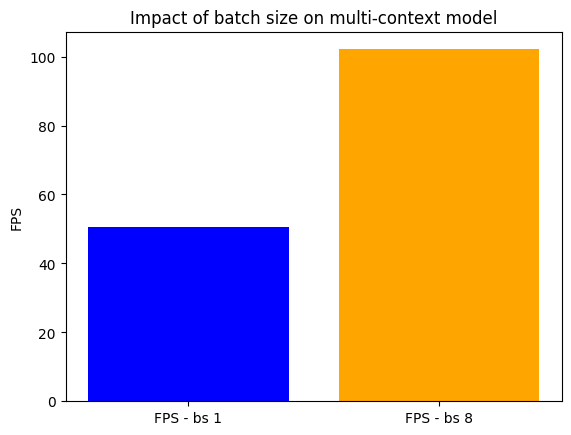
Output: Running with batch size - 1, Observed FPS: 50.70
Batch size=8
# Load the model
model_spec = ModelSpec(
    model_name=multi_context_model,
    zoo_url="https://hub.degirum.com/degirum/hailo",
    inference_host_address=inference_host_address,
    model_properties={"extra_device_params": {"HAILO_BATCH_SIZE": 8}},  # Set hailo batch size to 8 for multi context model
)

model_b = model_spec.load_model()

model_b.output_postprocess_type = "None"

multi_context_bs_8_results = degirum_tools.model_time_profile(model_a, iterations)
print(f"Running with batch size - {str(model_b.extra_device_params.HAILO_BATCH_SIZE)}, Observed FPS: {multi_context_bs_8_results.observed_fps:5.2f}")
Output: Running with batch size - 8, Observed FPS: 102.13
Here’s a code snippet to vizualise above results:
import matplotlib.pyplot as plt

# Labels and data
labels = ['FPS - bs 1', 'FPS - bs 8']
values = [multi_context_bs_1_results.observed_fps, multi_context_bs_8_results.observed_fps]

# Plotting
plt.bar(labels, values, color=['blue', 'orange'])

# Customizing
plt.ylabel('FPS')
plt.title('Impact of batch size on multi-context model')

# Show plot
plt.show()
Observations
For the YOLOv8n model, we observe no significant FPS improvement when increasing the batch size. This aligns with expectations since the model fits within a single context and already utilizes the hardware efficiently.
On the other hand, the YOLOv8m model shows a notable increase in FPS when switching from batch size 1 to 8. This confirms that eager batching is effective for multi-context models that benefit from parallel processing.
Conclusion
Eager batching can significantly enhance inference throughput, but only for models large enough to span multiple contexts. For smaller models that fit into a single context, batching won’t improve performance. It is recommended to review your model’s context requirements first to determine eager batching will benefit your specific scenario. By understanding model context and evaluating FPS under different batch sizes, you can make informed decisions to optimize throughput based on your specific use case.