Hi all,
I am trying to build a three-stage model pipeline, but I’m running into errors and I’m no longer sure whether I’m wiring the models correctly.
My goal is this:
- Crop a single large ROI (shifted)
- Inside that ROI: use tiling
- Fuse detections with BoxFusionLocalGlobalTileModel
This Image1 shows what we want to achieve:
- Blue = full frame
- Green = one big ROI crop (under the hood: max extent of several polygons)
Note: it’s not a crop/margin percentage, because it is shifted in x and y directions - Red= tile grid with edge-aware fusion
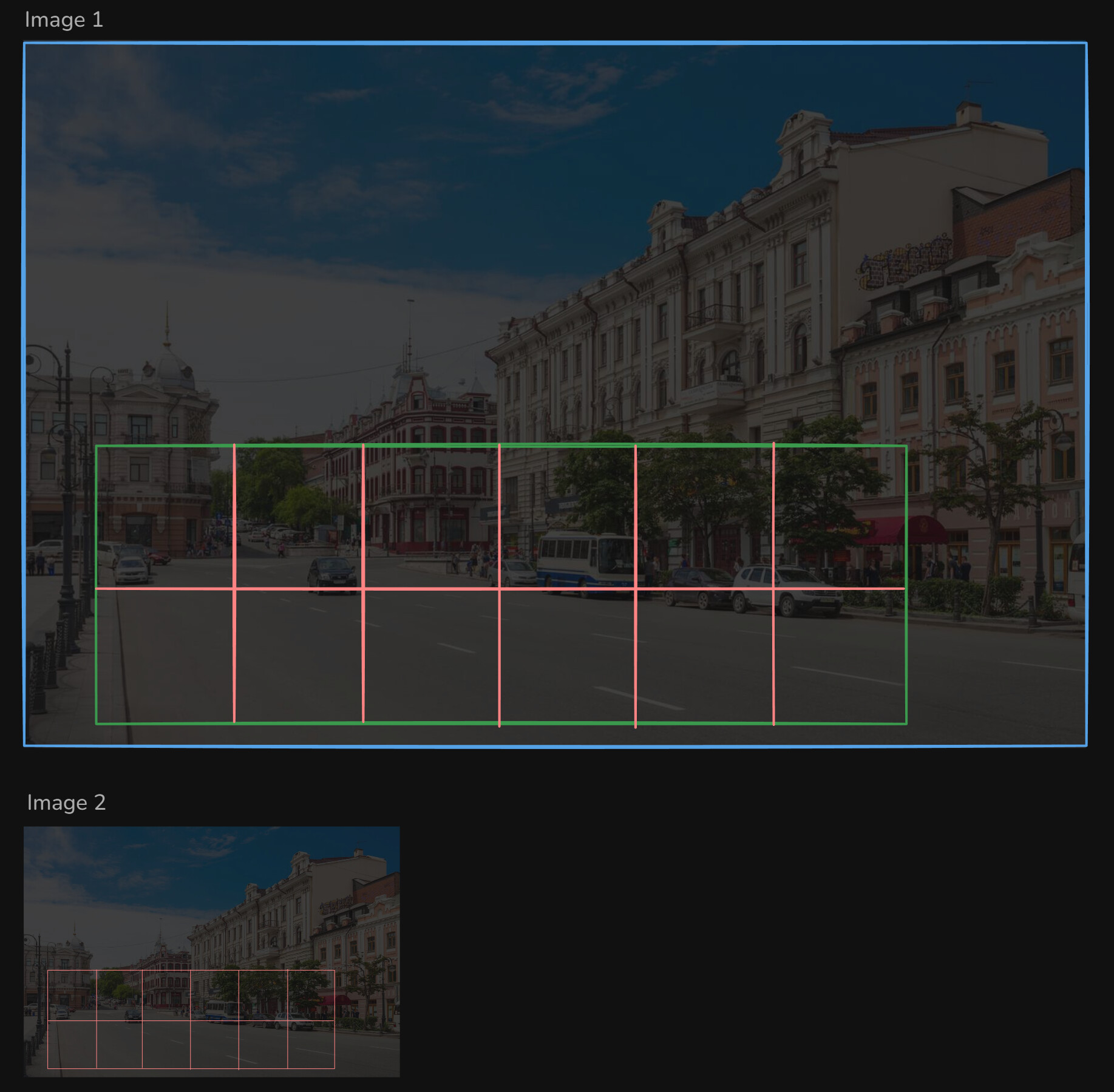
I managed to get everything working with (Image 2) a custom “manual tile generator”
simply creating many sub-ROIs and running the detection model on each.
However, with that approach I lose all the advanced features of the official tile system, such as edge-aware box fusion.
That’s why I’m trying to adopt the built-in TileExtractorPseudoModel + BoxFusionLocalGlobalTileModel, but wiring them correctly has been difficult.
# Base detection model
model = dg.load_model(...)

tile_extractor = TileExtractorPseudoModel(
    cols=3,
    rows=2,
    overlap_percent=0.15,
    model2=model, # not sure....
    global_tile=True,
)

tiled_detector = BoxFusionLocalGlobalTileModel(
    tile_extractor,
    model, # not sure....
    # ...
)

max_extent_box = [x1, y1, x2, y2]   # computed from ROIs
roi_pseudo = RegionExtractionPseudoModel(
    [max_extent_box],
    model, # not sure....
    # ...
)

tiled_model = CroppingAndDetectingCompoundModel(
    roi_pseudo,        # model1: produces one ROI bbox?
    tiled_detector,    # model2: tile model runs inside that ROI?
    crop_extent=0.0, # I can't use this I guess, because of my shifted x/y
)
Am I understanding the intended use of the CompoundModels correctly?
I want to confirm that I’m combining RegionExtractionPseudoModel, CroppingAndDetectingCompoundModel, and the tile-based models in the way the framework was designed.
Is this approach a good idea in general?
Conceptually it seems clean: crop to a large ROI first, then perform tiling and fusion inside that ROI. But I’m not sure whether this is the recommended or optimal pattern within the DeGirum Tools architecture.
Bonus question
I would also really like to access or use the cropped image itself (i.e., the image after the large ROI crop — the “green box” in the image) inside my processing pipeline.
Is there a way in DeGirum Tools to retrieve the cropped image produced by CroppingAndDetectingCompoundModel?
 first let us get it to work properly